Category:
AI Usage Tracking Guide
Published date:

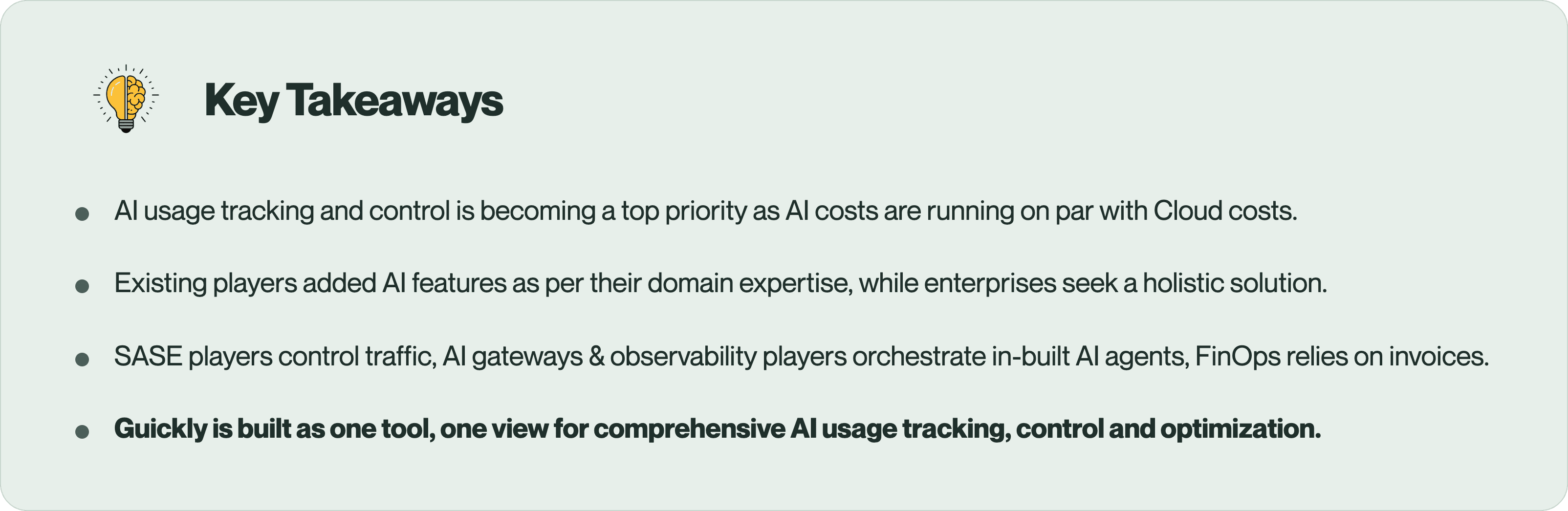
AI usage is exploding across enterprises and no one in the company can account for the full AI usage and inventory. According to Microsoft and LinkedIn Work Trend Index, 78% of employees who use AI at work bring their own tools rather than company-approved ones. AI usage is also becoming the largest (and most bloated) line item in the P&L, with very limited ownership.
Some existing players, each an expert in their own domain, have added features on top of their existing solutions to streamline AI governance. But none of them attack the problem of "AI usage tracking" as a whole. Enterprises can duct-tape them together, but getting the executive level bird's-eye view needs multiple vendors and consoles. Meanwhile, the return on investment (ROI) for AI still remains a mystery.
Guickly Magic Quadrant illustrates how each player is trying to solve a segment of this complex puzzle. However, Guickly is built ground-up to address pains that we ourselves faced and repeatedly learned from over 200+ CXOs conversations.
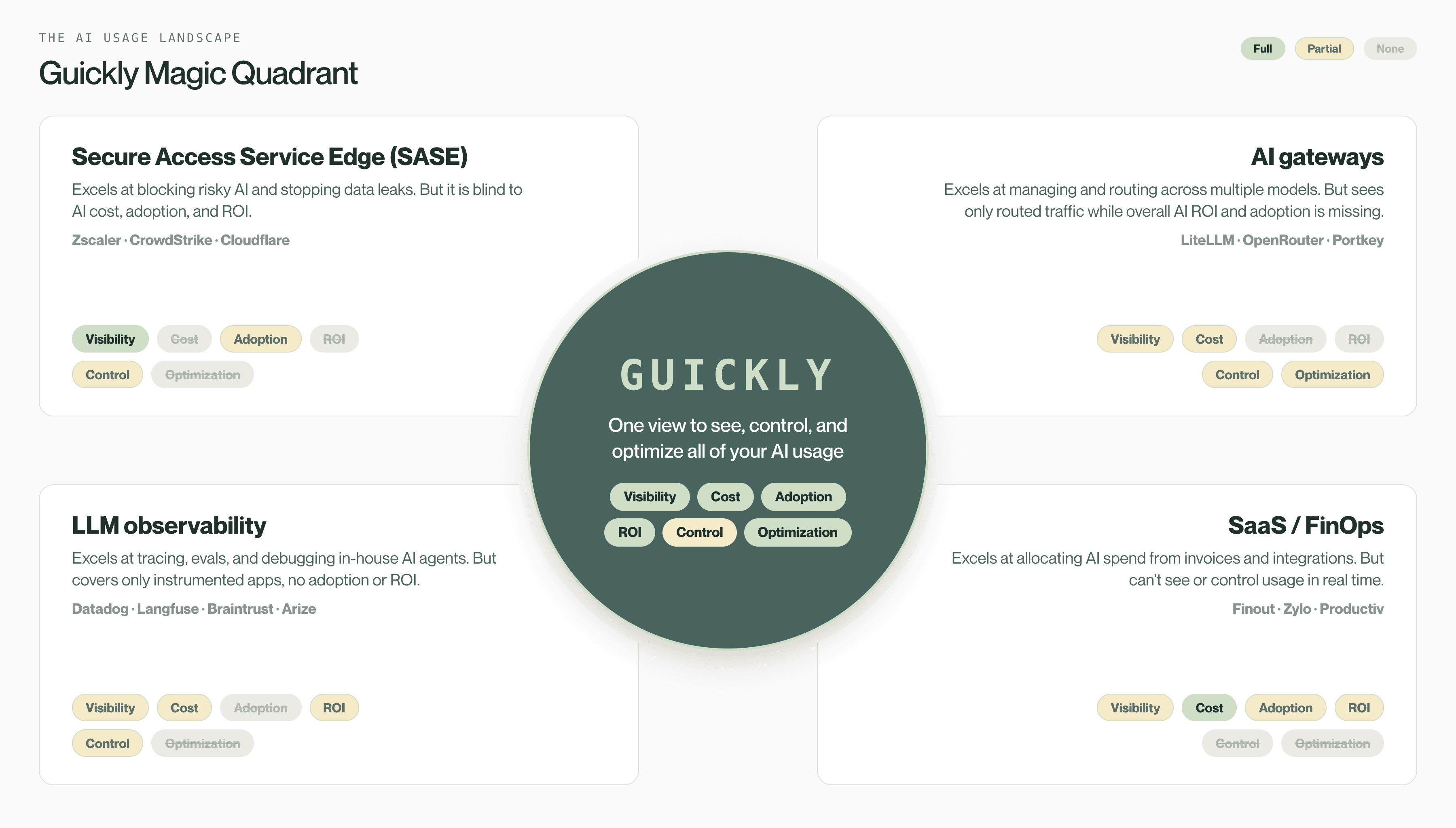
Let's deep dive into what each category offers and where they are limited
Category 1: SASE platforms
The network security incumbents sit between employees and the internet. Using network logs, they discover which AI apps are in use and enforce policies on what data can flow through them.
Examples: Zscaler AI Protect, CrowdStrike Falcon AIDR, and Cloudflare Zero Trust.
What it does well | Where it stops |
|---|---|
Discover which AI apps are used | No spend attribution |
Enforce access and control policies | No AI cost optimization |
AI-aware DLP and prompt-injection blocking | No AI ROI deduction |
Audit-ready compliance evidence | Limited AI adoption analytics |
Best for: Teams that mainly need to block risky AI apps and prevent data leaks.
Category 2: AI gateways and routers
These are specialized middleware that sit in front of in-house AI agents and the LLMs. Gateways analyze, route and meter only the traffic sent through them. They are built for engineers; they miss the wider AI inventory and can't give a CXO the org-wide view of cost, usage, and ROI.
Examples: LiteLLM, OpenRouter, and Portkey.
What it does well | Where it stops |
|---|---|
Route traffic across multiple models | See only routed traffic |
Caching and budgeting for in-house AI agents | Shadow and SaaS AI are invisible |
Apply policies on routed traffic | Per-user attribution is manual for individual keys |
Model-level cost tracking for routed traffic | Doesn't deduce the AI ROI |
Best for: Engineering teams routing, caching, and budgeting the AI apps they build themselves.
Category 3: LLM observability platforms
These are engineering tools for tracing, evaluating, and debugging the AI applications built in-house. They are ideal for monitoring the quality of these applications, but like AI gateways, they give a CXO little visibility beyond the apps that are instrumented.
Examples: Datadog LLM Observability, Langfuse, Braintrust, and Arize.
What it does well | Where it stops |
|---|---|
Tracing, evals, and debugging of in-house agents | Needs SDK instrumentation |
Latency and performance monitoring for AI apps | Invisible to the C-suite |
Output and cost measurement of in-house apps | No shadow AI discovery or policy control |
Drift and regression alerts on model quality | Doesn't deduce ROI and spends holistically |
Best for: Engineering teams evaluating and monitoring the quality of the AI apps they own.
Category 4: FinOps platforms
These are spend and SaaS management platforms that are extending to cover AI. They attribute the AI cost that shows up in billing and expense systems. Built for finance and procurement, they are retrofitting a SaaS-spend management model onto AI usage.
Examples: Finout, Zylo, and Productiv.
What it does well | Where it stops |
|---|---|
Attribute AI spend across only sanctioned vendors | See invoices, not actual AI usage |
Integrate with large set of model providers | Blind to Shadow and free-tier AIs |
Planning and budget analysis | Not real-time, dependent on invoices |
Surfacing finance first view | Can't control risks or optimize costs |
Best for: Finance and procurement teams consolidating the AI spend that already shows up in their billing systems.
The gap no single category covers
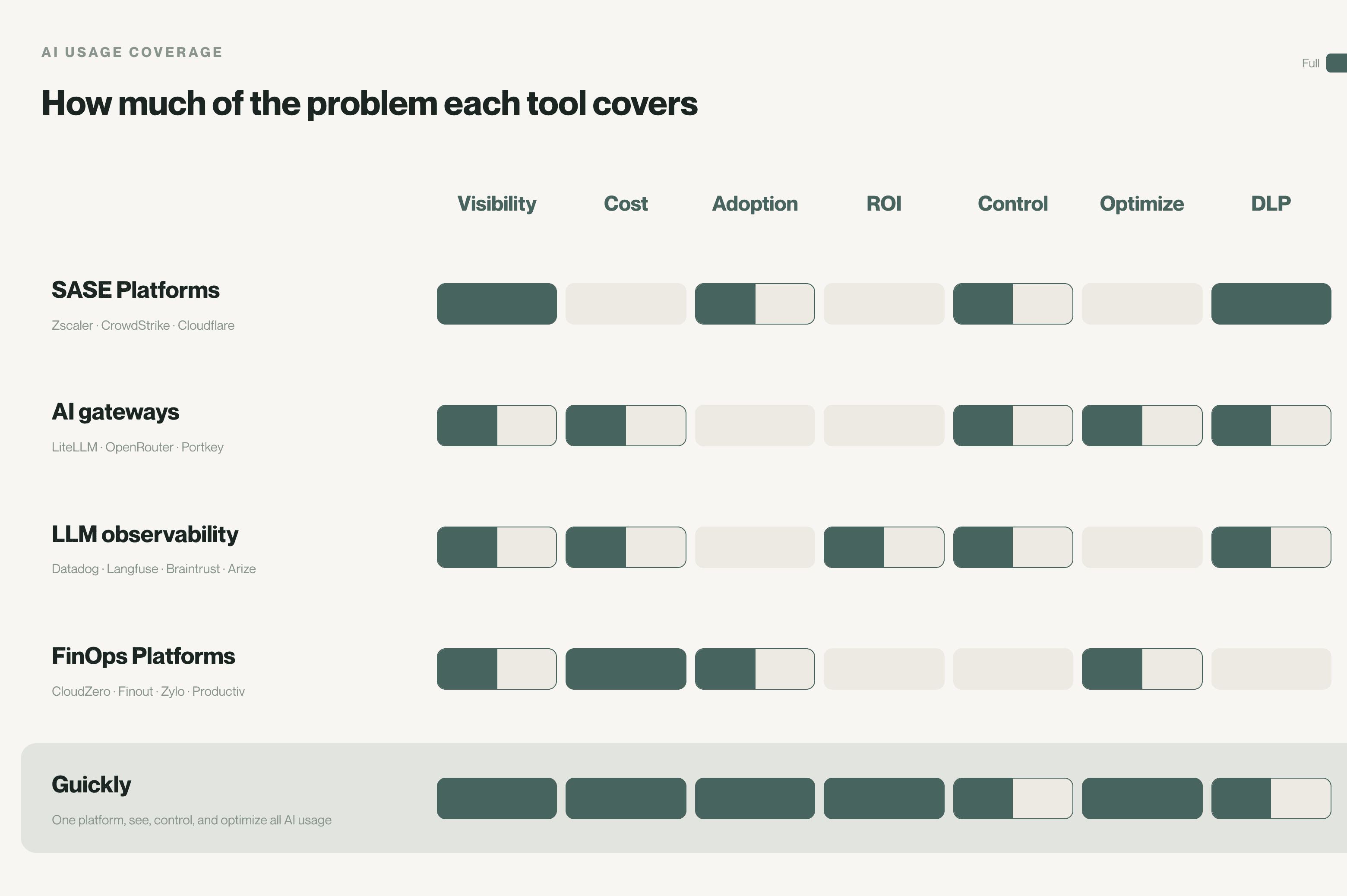
Each of these players excels at their own niche, but none of them rightfully combines all the required capabilities in one view. This is "The Hidden Cost of AI Freedom: When AI Sprawl Adds Up", which we have seen closely from the tooling side.
This limitation shows up in the analysing ROI. In fact, 95% of enterprise generative AI pilots (MIT NANDA, 2025) show no measurable impact on the P&L, and only 6% of companies attribute more than 5% of EBIT (McKinsey State of AI, 2025) to AI.
AI usage coverage meter below readily helps in selecting the right tool based on your needs.
Two honest concessions:
If you only need to block risky AI on your network. Then your existing Zscaler or CrowdStrike add-ons will suffice.
If you only run the AI you built and don't use AI for wider use cases, then a gateway plus observability might work from an engineering perspective. But it leaves you vulnerable to any non-routed traffic.
The point is not that these tools are weak. It is that no single platform can completely answer the fundamental questions in one place. And that's what we are building.
Guickly offers one view for every question leaders are asking
A year ago, the question was, "Is this secure?" and the security tools answered it well.
It is no longer the only question.
Now the questions span across technology, security, and finance.
🚨 Is AI moving the revenue needle?
🚨 Where is every AI dollar going?
🚨 What's running, what's rogue, what's redundant?
🚨 How Al-mature is my company?
If a tool answers the first two but not the last two, you have a "cost reporter". If it answers the last two but not the first, you have a "security tool". A complete view answers all four.
Guickly answers all of them in one view.
🪄 See: Every AI tool, user, and dollar, along with adoption and spend broken down by team, vendor, and intent.
🪄 Control: Brings shadow AI under control, with risks flagged by the user and the tool.
🪄 Optimize: Cuts AI spend through caching and semantic routing without compromising quality
All alongside the security stack you already run and truly completes your AI transformation. To see your own AI footprint, book a 15-minute walkthrough with Guickly.

" height="16.667px" id="PxKarjvpl" width="16.667px"/></svg>)